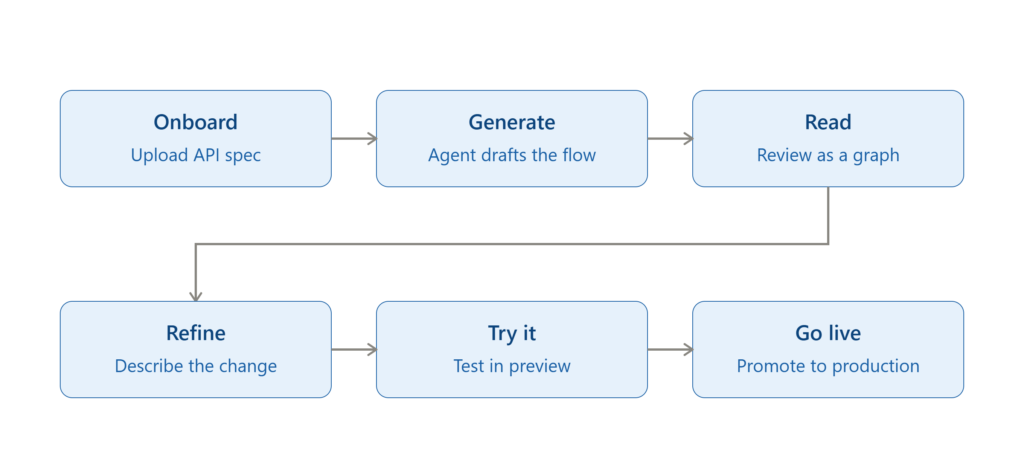
The Expanse module on the CloudBlue Connect platform lets vendors build a working fulfillment integration by describing it in plain language instead of writing code. Expanse lets a non-technical user (such as a vendor’s product manager) draft a technical integration by conversing with an AI agent — reading the result as a visual workflow, refining it in natural language, and promoting it to production when it’s ready. Our EaaS remains the right path for teams that need full custom code; Expanse sits beside it as a faster, no-code alternative for everyone else.
What is Expanse?
Expanse is an AI-mediated automation builder for product fulfillment. A vendor points it at their product’s API (an OpenAPI document), and an agent drafts an Automation — a declarative specification of how Connect requests should be fulfilled. The vendor reviews the draft as a node graph, asks the agent to adjust it in natural language, tests it against real requests in a safe environment, and then promotes it to production. No vendor code runs at runtime — a Connect-managed engine executes the specification instead.
Why Expanse
Integrating a product through Connect has traditionally meant building a connector: an EaaS extension that bridges Connect’s request lifecycle to the vendor’s own API. That takes real engineering effort through understanding Connect’s request model, handling retries and idempotency, and maintaining the code for as long as the product is transacted. For many vendors who are early in their channel journey, or simply do not have the resources to build an integration, it’s often the reason a product never makes it onto the platform.
Expanse was built to close that gap. It automates the parts of integration-building that used to require a developer — reading the vendor’s API, mapping it to Connect’s fulfillment events, and generating the logic that runs against real orders — while keeping the vendor in control of every decision along the way. The result is that a fulfillment integration that used to take weeks or months of engineering can go from a raw API document to a live, order-processing automation in the same afternoon.
Building an Automation with Expanse
Expanse guides the vendor through a structured, wizard-like flow. The module is organized around three areas — General, where the vendor sets up what’s being automated; Workspace, where the agent drafts and the vendor refines the automation; and Deployments, where the vendor promotes and monitors it across environments.
Onboard: The vendor selects a product already configured in Connect and points Expanse at the vendor’s API by input the URL endpoint or uploading an OpenAPI document, optionally with a few sentences of context about how the API behaves. No coding and no environment setup is required at this stage.
Generate: The agent reads the product definition, the API document, and any notes the vendor provided, and drafts a specification for each fulfillment event the product needs to handle such as what happens when a customer purchases, changes, or cancels a subscription.
Read: Each event’s draft is rendered as a node graph in the Workspace and the API calls the automation will make, the decisions it will evaluate, and the data it will save. Reviewing the graph is how the vendor confirms the agent understood the product correctly, without needing to read any code.
Refine: The vendor describes any needed change in plain language. For instance, “don’t create a new customer if the email already exists, reuse that one” and the agent updates the affected part of the graph. Every iteration is saved as a revision, so the vendor can always roll back to an earlier version.
Try it: Promoting the automation to the preview or test environment runs it end-to-end against real test requests, so the vendor can watch it execute and confirm it behaves as expected before anything reaches customers.
Go live: Once satisfied, the vendor promotes the automation to production, and Connect begins routing live customer orders through it. If something isn’t right, the vendor can roll back to the previous version in a single click — no redeployment required.
General Features & Benefits
The following outlines how the Expanse module benefits your organization and simplifies the vendor onboarding experience:
Faster time-to-integration: Vendors go from an API document to a live, order-processing automation in hours instead of the weeks or months a coded integration typically takes.
No code required: The supported fulfillment scenarios (subscription purchase, change, and cancellation) are built entirely through the agent and reviewed visually, with no engineering resources needed.
AI-drafted, human-approved: The agent produces the first draft of every automation, but nothing is deployed to production without the vendor reviewing and explicitly promoting it.
Natural-language refinement: Adjustments are made by describing the desired change in plain language rather than editing configuration or code directly.
Safe environments and easy rollback: Every automation has separate preview, test, and production environments, and any deployment can be rolled back to a prior version in a click.
Coexists with existing connectors: An Automation can be built and tested alongside a product’s existing EaaS connector without affecting live traffic, making migration low-risk.
Secure credential handling: Vendor API credentials are stored and resolved through the Connect Vault module rather than inside Expanse itself.
Full revision history: Every draft, edit, and deployment is recorded, giving vendors a complete, auditable history of how their automation evolved.
Expanse vs Extension-as-a-Service (EaaS)
Extensions-as-a-Service (EaaS) is Connect’s code-based fulfillment path that allows engineering teams to build and maintain custom integrations using the Connect EaaS SDK, which provides full control over integration logic. Alternatively, Expanse provides a no-code alternative for building out integrations — a vendor product manager (or CloudBlue solutions engineer) provides an OpenAPI spec, and the Expanse AI agent drafts the fulfillment logic as a visual workflow that can be refined in plain language, no engineering resources required. In general, experienced engineering teams may choose EaaS when full custom logic is expected; and other teams may choose Expanse when quick integration delivery (with minimal engineering involvement) is prioritized.